
iCrosss Lite1.0.2 - Get APK
You'll be able to download in few seconds.
Publisher Description
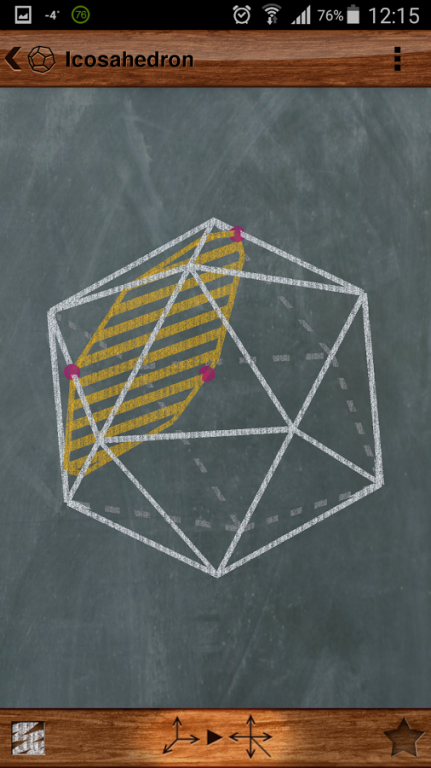
iCrosss Lite is a free version of popular and unique educational application iCrosss which will help you learn solid geometry in an easy and funny way.
iCrosss allows you to build a cross-section of each available polyhedra by your defined plane. The plane can be defined by three points (taps) on polyhedron faces. The application supports such kinds of polyhedra as regular polyhedra (Platonic solids), Pyramids, Prisms, Anti-prisms and Archimedean solids and duals. Polyhedrons are displayed in 3D representation, which allows you to rotate it in any direction. Cool chalkboard drawing style and fonts were used for awesome look’n’feel. To build a cross-section you have to put three points on polyhedron faces in order to define a section plane.
There is two view modes that you can use for better cross-section experience: 3D mode and 3D cut mode. 3D cut mode is available only when you have already built cross-section. In this mode you can choose one of two solid pieces of initial polyhedron to continue work with. Available option for printing and sending via e-mail of the polyhedron or its section. You can access information regarding selected solid, which includes short description, number of faces, vertices, edges, web-link for more information and useful formulas. Polyhedra are organized in simple list divided by categories.
A tutorial mode was designed for quick understanding. It will take you through the general application features.
About iCrosss Lite
The company that develops iCrosss Lite is Oleh Yudin. The latest version released by its developer is 1.0.2.
To install iCrosss Lite on your Android device, just click the green Continue To App button above to start the installation process. The app is listed on our website since 2015-04-02 and was downloaded 0 times. We have already checked if the download link is safe, however for your own protection we recommend that you scan the downloaded app with your antivirus. Your antivirus may detect the iCrosss Lite as malware as malware if the download link to com.olehyudin.icrosss.lite is broken.
How to install iCrosss Lite on your Android device:
- Click on the Continue To App button on our website. This will redirect you to Google Play.
- Once the iCrosss Lite is shown in the Google Play listing of your Android device, you can start its download and installation. Tap on the Install button located below the search bar and to the right of the app icon.
- A pop-up window with the permissions required by iCrosss Lite will be shown. Click on Accept to continue the process.
- iCrosss Lite will be downloaded onto your device, displaying a progress. Once the download completes, the installation will start and you'll get a notification after the installation is finished.
Program Details
System requirements
Download information
Pricing
Version History
version 1.0.2
posted on 2015-04-02
Disclaimer
External Download
We do not host iCrosss Lite on our servers. We did not scan it for viruses, adware, spyware or other type of malware. This app is hosted by Galad and passed their terms and conditions to be listed there. We recommend caution when installing it.
The APK Download link for iCrosss Lite is provided to you by apps112.com without any warranties, representations or guarantees of any kind, so access it at your own risk.
If you have questions regarding this particular app contact the publisher directly. For questions about the functionalities of apps112.com contact us.
